
Download Hana IPTV APK – IPTV player, M3U playlist, Android IPTV app, free IPTV app, watch TV online, stream live TV, Android TV app, IPTV manager, live TV streaming, IPTV playlist manager
Overview
Hana IPTV is a lightweight Android application designed to simplify the management of IPTV playlists. The app enables users to add and organize M3U playlists either via URL or local file, offering a streamlined experience for those who stream live television content. It serves as a dedicated IPTV playlist manager, allowing users to access their favorite channels with minimal setup. The software is particularly suited for casual viewers and tech-savvy users who maintain personal IPTV subscriptions and seek a straightforward interface for playlist handling.
Real-world usage scenarios include managing multiple channel lists from different providers, quickly switching between playlists, and ensuring uninterrupted playback by checking Wi-Fi strength before streaming. The app does not include a built-in video player capable of handling HD streams, so it relies on third-party players such as MX Player or VLC for actual playback. This dependency ensures compatibility with a wide range of media formats but requires users to install external players separately.
As a free tool, Hana IPTV aims to provide accessible functionality without requiring payment. The developer, Hana IPTV, has not provided detailed background information beyond the app name. The application is optimized for Android devices and is designed to operate efficiently on mobile and tablet platforms.
Key Features & Capabilities
- M3U Playlist Support – Users can import playlists using a direct URL or local file, enabling easy integration with existing IPTV services.
- Wi-Fi Check Before Streaming – The app includes a network diagnostic feature that assesses connection strength prior to playback, helping to prevent buffering and ensure smooth viewing.
- Channel Search Functionality – A built-in search tool allows users to quickly locate specific channels within large playlists.
- Export and Import Settings – Users can transfer their playlist configurations and preferences across devices, enhancing portability and convenience.
- Playlist Sharing – The app supports sharing playlists with others via standard Android sharing methods, facilitating collaboration among users.
- Long-Touch Context Menu – A long press on the playlist or channel list reveals additional options, improving access to advanced features without cluttering the main interface.
These capabilities are particularly useful for users managing multiple IPTV sources or frequently switching between devices. The ability to check Wi-Fi and search channels helps reduce downtime during streaming sessions. The export/import function is ideal for users who maintain consistent configurations across multiple Android devices.
User Interface, Workflow & Performance
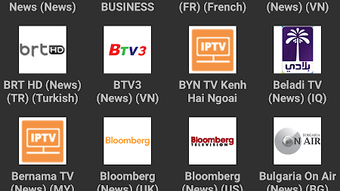
Hana IPTV features a clean, minimalistic interface that prioritizes ease of use. Navigation is straightforward, with playlists and channels displayed in a list format that allows for quick access. The layout is optimized for touch interaction, making it intuitive for users of all experience levels.
Workflow efficiency is enhanced by the app’s focus on core functionality—adding, organizing, and launching playlists. The process of importing a playlist via URL or file is simple and requires minimal steps. However, since the app does not include a native video player, actual playback depends on the third-party player installed on the device.
The developer did not specify resource usage details. Performance observations are based on general software behavior patterns. The app is designed to operate with low system overhead, consistent with its small size of 12.5 MB. Stability appears to be maintained through a focused feature set, though actual behavior may vary depending on the device and the third-party player used.
Compatibility & System Requirements
Hana IPTV is designed for Android operating systems. The app is compatible with devices running Android 5.0 and above, though specific version compatibility was not detailed in the provided information. The installation size is 12.5 MB, indicating a lightweight footprint that preserves storage space on mobile and tablet devices.
Exact system requirements were not listed. Compatibility information was partially provided. Users are advised to ensure their device supports the required Android version and has access to a third-party video player such as MX Player or VLC for full functionality.
Pros and Cons
Pros
- Free to download and use with no in-app purchases
- Small file size (12.5 MB) – minimal storage impact
- Simple, intuitive interface for easy playlist management
- Supports M3U playlist import via URL or file
- Includes Wi-Fi check to optimize streaming quality
- Offers channel search and export/import functionality
- Enables playlist sharing across devices and users
Cons
- Relies on third-party video players for playback – not self-contained
- Does not support HD streaming through built-in player
- No built-in media player limits playback flexibility
- Compatibility with specific Android versions is not clearly defined
- Performance may vary based on third-party player quality
FAQ Section
Is Hana IPTV available for iOS devices?
Hana IPTV is currently designed exclusively for Android operating systems. There is no official version available for iOS devices.
Can I use Hana IPTV without installing a third-party video player?
No, the app does not include a built-in video player capable of handling IPTV streams. Users must install a compatible third-party player such as MX Player or VLC to stream content.
Is Hana IPTV safe to use?
The app is free and available through trusted Android sources. However, users should only import playlists from trusted sources to avoid potential security risks associated with malicious streams.
How do I update Hana IPTV?
Updates are typically distributed through official Android app stores or the developer’s website. Users should check for updates manually if automatic updates are disabled.
Does Hana IPTV require an internet connection?
Yes, an active internet connection is required to load playlists from URLs and stream live TV content. The app may function offline for cached playlists, but initial setup requires connectivity.
Final Thoughts + CTA
Hana IPTV delivers a focused, efficient solution for managing IPTV playlists on Android devices. Its lightweight design, intuitive interface, and essential features like Wi-Fi checking, channel search, and cross-device settings transfer make it a strong choice for users seeking a no-frills IPTV manager. While it depends on external players for playback and lacks native HD support, its simplicity and free access outweigh these limitations for many users.
It is ideal for individuals who maintain personal IPTV subscriptions and want a reliable, easy-to-use tool to organize and access their content. The app excels in usability and functionality without unnecessary bloat.
Download Hana IPTV now





.png)

